Naviceivers for Campers
Citroën Jumper II/III 2006+
Fiat Ducato III/IV 2006+
Fiat Ducato 8 2021+
Ford Transit 2020+
Mercedes-Benz Sprinter 2006+
Mercedes-Benz Vito 2007+
Opel Movano III 2021+
Peugeot Boxer II/III2006+
Renault Master III 2019+
Volkswagen Crafter 2006+
Cameras
Naviceivers/Moniceivers
Sound Systems
Navigation Software
Accessories
PRODUCTS



GENERAL – i45 without 4G
1. Your own boot logo is not recognized?
The file must have the following attributes in order to be recognized as a boot logo / start logo:
File format: JPEG
Resolution: 1024 x 600 Pixels, at least 72 dpi
File size: max. 500 kB
Edit the image file accordingly with a commercially available image processing program and then save it on a USB stick that you can connect to the naviceiver.
2. Would you like to reset the device to the factory settings?
Remedy:
Tap on „System“ in the Main Menu and scroll down down an tap on „Factory Reset“.
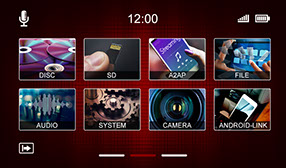
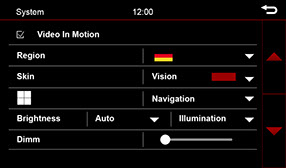
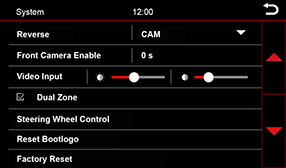
Note:
To delete user files such as images or videos, please use the file manager (FILE) as described on page 44 of the user manual.
3. Your device is very slow or has stopped responding?
Solution: reset device
Use a suitable object to press the reset button on the top right of the device.
Alternatively: To do this, press and hold the multifunction button  for more than 6 seconds.
Attention: All user settings will be deleted
4. The connected rear view camera is not transmitting a picture?
Please note that there are different versions of the ESX VNC1045-DBJ naviceiver.
The enclosed cable sets of the different versions are not compatible with each other!
If you have problems with the camera image, please compare the sticker on the top of the device with the assignment of the connection cables used.