Naviceivers for Campers
Citroën Jumper II/III 2006+
Fiat Ducato III/IV 2006+
Fiat Ducato 8 2021+
Ford Transit 2020+
Mercedes-Benz Sprinter 2006+
Mercedes-Benz Vito 2007+
Opel Movano III 2021+
Peugeot Boxer II/III2006+
Renault Master III 2019+
Volkswagen Crafter 2006+
Cameras
Naviceivers/Moniceivers
Sound Systems
Navigation Software
Accessories
PRODUCTS



Cameras – i50 / i60 / i61
All ESX Smart Naviceivers are usually preset for analog CVBS cameras. If you use an original camera that is already installed in the vehicle, a third-party camera or an analog AHD camera, the settings in the device may need to be adjusted or changed accordingly.
Please note the relevant information in the enclosed “Installation Guide” (black band).
1. Your connected camera is not working or not displaying properly?
If your camera is connected correctly and still does not work correctly or no camera image or an incorrect camera image is displayed on the monitor, you may need to select the appropriate setting. To do this, briefly tap the screen in the camera view (with reverse gear engaged or by pressing the camera direct button) until the gear appears at the top right.
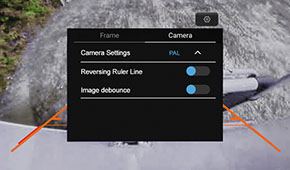
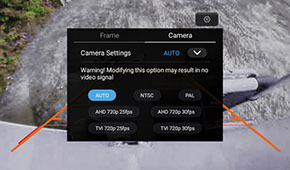
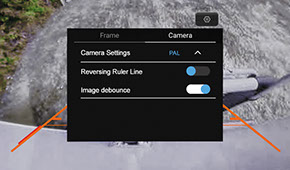
Tap under "Camera Settings" on the triangle symbol
There you can specify the type of camera connected if the camera view with the "AUTO" function is incorrect.
For ESX HD cameras the setting should be "AHD 720p 25 fps". Normal ESX cameras work with the "PAL" setting, except the VNA-RCAM-CS180/190 models, which work with the "NTSC" setting.
If the camera view does not activate when you put the car in reverse or there are other problems with the view, tap the "Image debounce" function.
2. Switching the camera views in reverse gear using the camera direct button doesn't work?
This is not a malfunction, because close-up vision always has priority when reverse gear is engaged and cannot be switched.